
Comparing AI personal finance assistants: ChatGPT, Gemini, Copilot and Claude
AI (short for artificial intelligence) has become an everyday tool for managing money. It can do everything from explain basic financial concepts to offer personalized help with your budget and savings plan to help you prepare for meetings with your financial advisor.
Not all AI assistants are the same, and each platform has its own strengths, weaknesses, and ideal use cases. If you’re comparing ChatGPT, Gemini, Copilot, and Claude and trying to decide which is better for managing your personal finances, keep reading to learn more from Wealth Enhancement.
TL;DR
- ChatGPT is best for learning about personal finances, including breaking down complex financial concepts and adapting to many different types of prompts.
- Gemini is best for Google Workspace users thanks to its easy integration with Gmail, Google Drive, Docs, and Sheets.
- Copilot is best for Windows and Microsoft 365 users who want an AI assistant they can use in their Outlook inboxes, as well as Word and Excel.
- Claude is best for reading and summarizing long PDFs, which can be helpful when reviewing documents from your financial advisor.
- Be mindful of the privacy settings for AI chats, especially when dealing with financial information
- Results will vary between AI tools. Test a couple of tasks to find one that works best for your situation.
What AI Assistants Can and Can’t Do for Your Money
ChatGPT, Google Gemini, Microsoft Copilot, and Claude are among the most popular AI assistants on the market. Each one brings different strengths to managing your personal finances.
Each of these AI tools has some similarities. They rely on technologies such as natural language processing, machine learning, and data analysis to understand and process your inputs, perform tasks, and learn from your interactions to improve their performance over time.
Typical Strengths for Consumers
AI assistants are excellent tools to help with learning and analysis. First, they can be an effective way to help you learn the basics of personal finances, from how a 401(k) works to different budgeting methods available.
AI is also well-suited to analyzing and summarizing information. For example, you could use an AI assistant to analyze and explain your spending trends, your retirement plan options, your workplace’s vesting schedule, and more.
Another way to use AI is to turn PDFs into plain language summaries. Did you receive a lengthy financial document from your workplace’s HR or your financial advisor, and you’re having a hard time getting through it and understanding it? An AI assistant could be useful for that task.
When used in conjunction with a financial planner, AI assistants can help you prepare for your meetings, draft questions you should ask, review information from your advisor, and create a schedule to tackle all of the tasks your advisor has recommended.
Real Limits You Need to Know
While AI assistants have some clear benefits for your personal finances, they also have some major limitations and risks.
First, as mentioned, AI isn’t 100% accurate. Most people who regularly use AI have likely had the experience of being provided with blatantly false information. Even if you’re only using it for learning, it could provide inaccurate information, which could lead you to make mistakes with your personal finances.
Next, there are some privacy risks when it comes to using AI, especially if you’re plugging in sensitive information. Each AI assistant has different privacy policies, and there’s no way to know your data is completely safe and isn’t being used to train the AI system. You should never enter sensitive information, such as your bank account numbers or Social Security number, into an AI tool.
Finally, AI isn’t really appropriate for personalized advice. AI assistants aren’t capable of the critical thinking and nuance needed to adapt their recommendations to your unique situation or goals.
Using AI as your sole source of financial information and advice could put you in a poor financial position that is difficult to come back from.
AI Assistants for Personal Finance – Quick Comparison
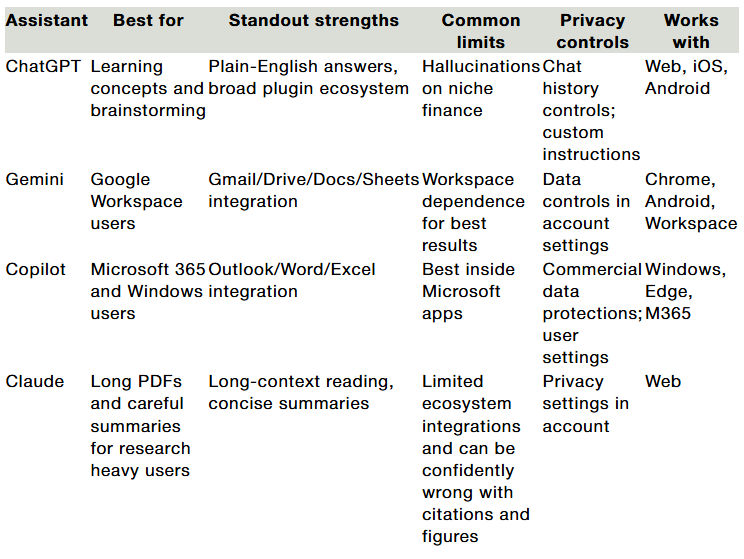
Deep Dives: Strengths, Gaps, Best Fit
ChatGPT
ChatGPT is ideal for explaining and breaking down both basic and complex financial topics. It can answer financial questions in clear, conversational language. ChatGPT can understand a wide range of different prompt types. It can also remember your conversations, which allows it to retain context and understand your unique needs and use cases. Many people use it as their primary AI assistant because of how easy it is to use, how it remembers things about you, and its versatility.
Gemini
Gemini, Google’s AI assistant, integrates well with the company’s other products. It’s good at summarizing emails, reading, analyzing, and interpreting files in your Google Drive, as well as assisting with budgeting and planning tasks in your Google Sheets. If you want a platform that can review and understand files, and you’re often working in the Google ecosystem, this is a great option for you.
Microsoft Copilot
Copilot is Microsoft’s AI assistant. Similar to Gemini’s integrations with other Google products, Copilot integrates well with other Microsoft products, including Outlook, Word, and Excel. It can help you summarize, analyze, and draft emails, quickly process documents, and analyze or refine spreadsheets.
Claude
Claude is best at reading, understanding, and summarizing long documents. Its long memory helps it approach long PDFs, including plan descriptions, disclosures, financial statements, and more. It’s also well-suited to writing, meaning it can help you draft correspondence with your financial planner. Finally, its careful reasoning makes it a good option for research-heavy tasks.
Practical Money Tasks You Can Try Today
AI assistants can help you with a variety of both simple and complex financial tasks and concepts. While it’s not the best option for personalized financial advice, here are some tasks for which it is well-suited.
Budget audit from a bank CSV
You can upload your bank account activity from a spreadsheet into an AI assistant and have it review and analyze your recent spending. It could show you where you’re spending most of your money, recurring expenses, and where you may be able to cut back.
Just make sure that before you upload any documents or spreadsheets, you’ve removed your account numbers and other sensitive personal data.
Explain your 401(k) match and vesting
401(k) plan documents can be difficult to navigate, but an AI assistant can help. You can upload your plan documents into an AI assistant and ask it to analyze and summarize the information, including how employer contributions work, your vesting schedule, and other benefits information. Finally, it can break down your investment options. While you shouldn’t rely on AI to choose your investments, it could help you understand your options better.
Debt management
Consider using an AI assistant to help you pay off your debt. You can upload a spreadsheet of all of your debts, including each one’s balance, interest rate, monthly payment, and payment term. From there, AI can help you create a debt repayment schedule that helps you pay off your debt faster and pay the least amount of interest. You can ask it to show you your potential savings across different methods, such as the debt snowball versus the debt avalanche.
Personal Finance Prompt Examples
- “Summarize this 401(k) plan PDF and list five action items I can discuss with my advisor. Keep bullets under 12 words.”
- “From this cleaned bank CSV, group expenses, flag subscriptions, and show a simple monthly budget.”
- “Explain Roth vs. Traditional contributions in plain English for a W-2 employee in a 24% tax bracket. Add a pros and cons list.”
- “Turn these meeting notes into three follow-up questions to ask my advisor about retirement timelines.”
- “Redraft this email to HR asking for plan fee disclosures, keep it polite and short.”
Safety and Privacy Checklist
Before you start using an AI assistant to manage your personal finances, there are some basic safety precautions you should understand.
Ground rules before you paste anything
Before sharing financial information with any AI tool, it’s important to follow best practices for privacy and security. Avoid sharing sensitive information, including account numbers, Social Security numbers, or full financial statements.
Before using any AI assistant, make sure to turn on account security and review their privacy policies and data controls so you know what information is and isn’t being stored. And here’s a pro tip: You can use AI to summarize the privacy policies and terms of service of the AI platforms.
Here are some additional resources you can turn to for guidance:
- FTC AI Reports and Press: https://www.ftc.gov/industry/technology/artificial-intelligence
- NIST AI Risk Management Framework: https://www.nist.gov/itl/ai-risk-management-framework
- FBI Internet Crime Report 2024: https://www.ic3.gov/AnnualReport/Reports/2024_IC3Report.pdf
- SEC Conflicts of Interest and Predictive Data Fact Sheet: https://www.sec.gov/files/34-97990-fact-sheet.pdf
Spotting AI-enabled scams
AI is increasingly being used across all industries, including fraud. It can be used to create deepfake videos, voice cloning, and phishing scams that are difficult to detect and easy to fall for. It’s important to understand how to recognize and protect yourself from these cyber-attacks and to immediately report anything suspicious.
Turn AI help Into a Plan
AI assistants are great companions for your day-to-day money tasks. Pick the one that fits your world and the job at hand: ChatGPT for learning and plain-English explanations, Gemini for heavy Google Workspace use, Copilot for Microsoft 365, and Claude for long documents. Keep privacy in mind, strip sensitive details before you paste, and treat any output as a starting point.
Quick next steps you can take today:
- Choose one assistant and turn on account security in its settings.
- Test two tasks: Summarize a 401(k) plan PDF and run a simple budget review from a cleaned bank CSV.
- Capture your questions and bring them to a planning conversation.
FAQs
Which assistant fits Microsoft vs. Google users better?
Microsoft Copilot is best for regular Microsoft users, as it integrates easily with other Microsoft products, including Outlook, Word, and Excel. Gemini, on the other hand, is best for Google users who want an AI assistant to seamlessly integrate with their other products.
Is my chat data used for training?
AI assistants are constantly learning, partially through past conversations with users. When you use AI, your chats could be used for training the assistant to get better. Depending on your AI assistant, you may be able to turn off this feature so that your chats are more private.
How do I keep chats private?
First, make sure your account is secure with a strong password and multifactor authentication. Most AI assistants also allow you to turn on enhanced privacy, but you’ll have to go into your settings to do this.
What about summarizing long PDFs like plan documents?
AI assistants are particularly well-suited to summarizing long PDFs, including plan documents. Claude is especially good at handling large documents and can provide clear, concise summaries.
Are there other AI tools that can help manage my personal finances?
There are thousands of AI tools available, some more specialized than others. You can discover these tools through simple online searches, online groups, or by asking AI.
This story was produced by Wealth Enhancement and reviewed and distributed by Stacker.