Automated invoice processing: A guide to simplifying AP
This story was produced by Ramp and reviewed and distributed by Stacker.
Automated invoice processing: A guide to simplifying AP
Automating your invoice process can significantly boost efficiency, reduce costs, and enhance accuracy. Manual workflows are often slow and prone to errors, but Ramp explains how with the right automation tools, businesses can streamline accounts payable processes, from invoice capture to payment processing.
What Is Automated Invoice Processing?
Automated invoice processing, or AIP, is the use of software to streamline and optimize how businesses handle their invoices. From receiving and validating invoices to approving and making payments, automation eliminates repetitive manual tasks like data entry, matching purchase orders, and routing documents for approval. This not only accelerates invoice cycles but also reduces errors, enhances cash flow visibility, and strengthens vendor relationships.
At its core, automated invoice processing transforms accounts payable workflows. Advanced technologies like Optical Character Recognition, or OCR, and machine learning validate invoices and extract data precisely, while preset approval workflows ensure seamless routing. The result? Faster approval processes, fewer bottlenecks, and a system that empowers AP teams to focus on strategic tasks instead of paper-based chores.
By adopting automated invoice processing, businesses gain more than just time savings—they minimize fraud risks, improve financial accuracy, and gain real-time insights into their cash flow. Whether it's matching prices or tracking approvals, automated invoice processing is the key to a more efficient, error-free AP process.
How Does Traditional Invoice Processing Work?
Traditional invoice processing is a manual, multi-step workflow that starts with logging invoices received via email, mail, or fax into the accounts payable system. From there, AP teams handle data entry, match invoices with purchase orders or receipts, and route them for approval—a process often delayed by bottlenecks and prone to human error.
Here's a closer look at each step in the traditional invoice processing workflow:
- Invoice receipt and data entry: AP teams manually log invoices received in varying formats (email, mail, etc.) and enter details like vendor name, invoice date, and amount into the system, a time-consuming step prone to errors.
- Invoice matching: AP staff manually match the invoice with relevant purchase orders (POs) and delivery receipts. This can involve 2-way matching (invoice to PO) or 3-way matching (invoice, PO, and delivery receipt), ensuring the invoice amount and details are accurate before approval.
- Approval workflow: Once verified, invoices are routed to department managers or budget holders for approval. This is often done through email chains or physical signatures, leading to bottlenecks when key personnel are unavailable or slow to respond.
- Payment authorization: After approval, invoices are forwarded to the finance team for payment. This might involve issuing checks or manually initiating ACH or wire transfers through the bank.
What Parts Can Be Automated?
Automation transforms the most time-consuming and error-prone parts of invoice processing into streamlined, efficient AP workflows. From capturing invoice data to approving payments, each step can be optimized to save time, reduce errors, and improve real-time visibility.
AI streamlines invoicing by automating data capture, matching invoices to POs, and flagging errors in real-time. For example, automation tools like Optical Character Recognition reduce manual entry, while automated approval workflows and anomaly detection prevent fraud and save valuable time—freeing finance teams to focus on strategic tasks.
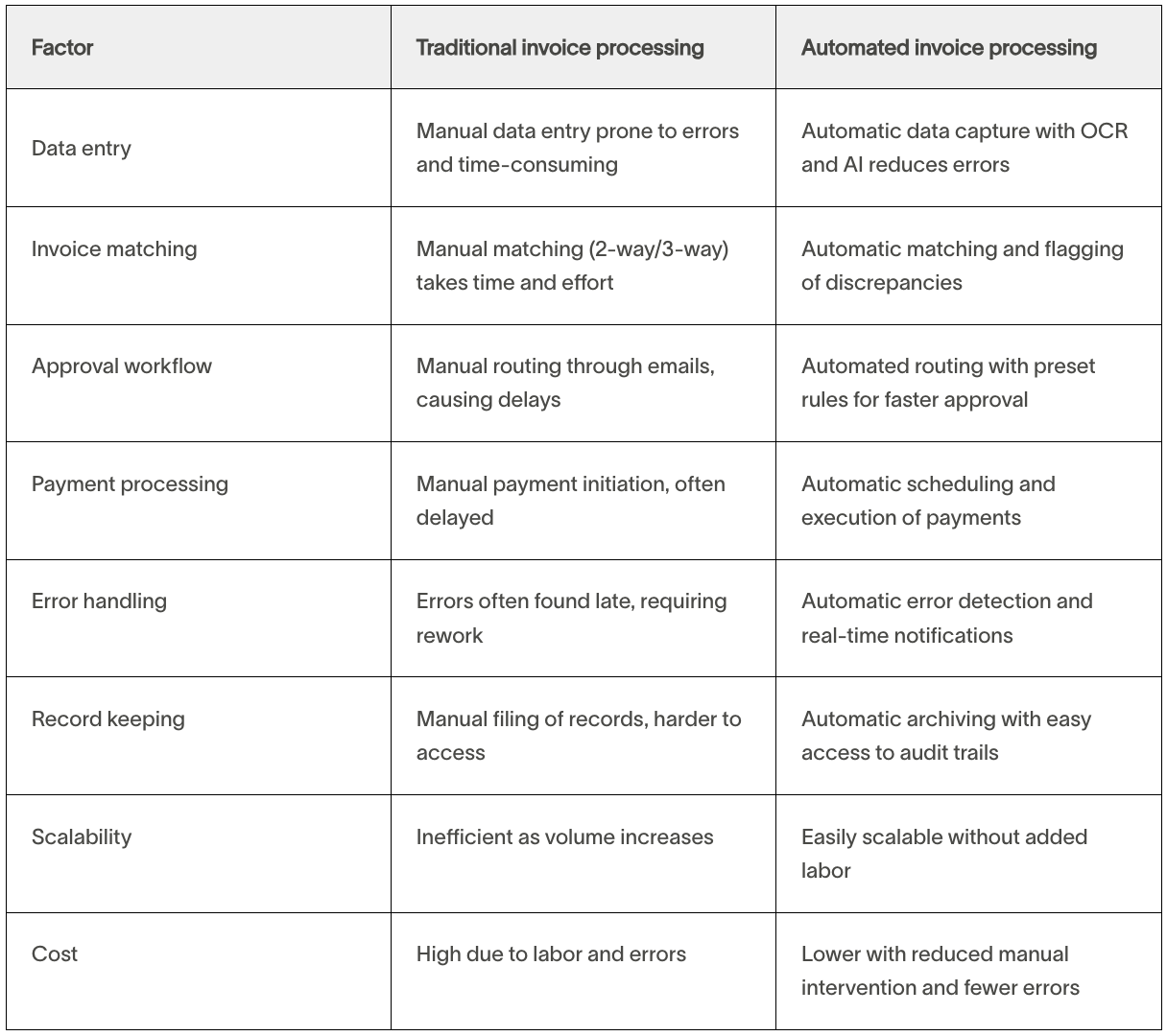
The table below highlights the key areas where automation replaces manual effort and delivers measurable improvements:
Benefits of Automated Invoice Processing
Automated invoice processing doesn't just save time—it transforms how businesses handle their accounts payable, turning a tedious workflow into a streamlined, scalable invoice processing system.
Here's how it can improve your business processes:
- Save time and cut costs: By automating manual tasks like data entry, matching, and approvals, businesses can process invoices faster and reallocate staff to more strategic work. This leads to significant cost savings on labor and operational expenses.
- Boost accuracy and minimize errors: Automation eliminates duplicate payments, incorrect calculations, and data entry mistakes, ensuring invoices are processed precisely. Advanced tools like AI and machine learning also flag discrepancies in real time for quicker resolution.
- Strengthen fraud prevention and compliance: Automated systems use intelligent algorithms to detect unusual patterns and prevent fraud. They also maintain detailed records, making compliance with financial regulations seamless and audits stress-free.
- Improve vendor relationships: Timely payments facilitated by automation help build trust with suppliers, unlock early payment discounts, and ensure smoother operations across the supply chain.
- Enhance cash flow visibility: With real-time tracking, businesses gain greater control over their spending and can make informed financial decisions with up-to-date cash flow insights.
- Scale without added costs: As your business grows, automated workflows handle increasing invoice volumes without requiring more staff, ensuring operations stay efficient.
With automation, your accounts payable team gains more than just efficiency—it's a step toward smarter, more sustainable financial operations.
How to Implement an Automated Invoice Process
Learning how to automate processing is simpler than you might think. By following a clear plan, you can streamline your accounts payable processes, reduce errors, and unlock time for more strategic work.
Here's how to set up your system for success:
- Step 1—Assess your current workflow: Review your current invoice processing workflow to identify time-consuming tasks like data entry, approval delays, or error-prone matching that automation can improve.
- Step 2—Select automation software: Look for invoice automation software with features like OCR, error detection, and seamless ERP integration to effortlessly handle multiple invoice types, automate data capture, and flag errors.
- Step 3—Customize your workflow: Set up workflows that align with your business rules. For example, use conditional logic to automatically route invoices above a specific dollar amount to senior approvers or flag discrepancies for immediate review.
- Step 4—Integrate with accounting systems: Connect your automation software with accounting software to streamline data exchange. A fully integrated system ensures accurate records and eliminates tedious manual data transfers.
- Step 5—Test and train your team: Before rolling out the system company-wide, run tests to ensure everything functions as expected. Train your team to use the software effectively, emphasizing how it simplifies tasks and improves efficiency.
- Step 6—Monitor and optimize: Once implemented, regularly review performance metrics and gather feedback from your team. Use these insights to fine-tune workflows and ensure the system continues to meet your business needs as it evolves.
By taking these steps, you'll reduce your invoice processing time while building a scalable, future-ready AP automation system that frees up your team for higher-value tasks.
What to Look for in Invoice Processing Software
When choosing invoice processing software, prioritize features that streamline workflows and integrate seamlessly with your systems. Key features to look for include:
- OCR technology: Automates data capture to reduce manual entry and error rates.
- System integrations: Seamless integration with platforms like QuickBooks, NetSuite, and other ERP systems to save time and ensure accuracy.
- Automated approval workflows: Look for software that automates routing invoices for approval based on predefined rules to approve invoices quickly and simplify workflow automation.
- Fraud prevention: Effective invoice processing software detects duplicate invoices and flags potential issues with audit trails and secure controls.
- Global support: Handle multiple currencies, tax regulations, and international payments by choosing software that supports multiple currencies and international payments.
- Reporting and analytics: Choose invoice processing software that provides real-time insights to manage cash flow and optimize expenses.
By focusing on these essentials, you'll find an automation solution that simplifies AP processes and invoice management.